Everything Lykoset does
Two simple tools, one for the day and one for the month.
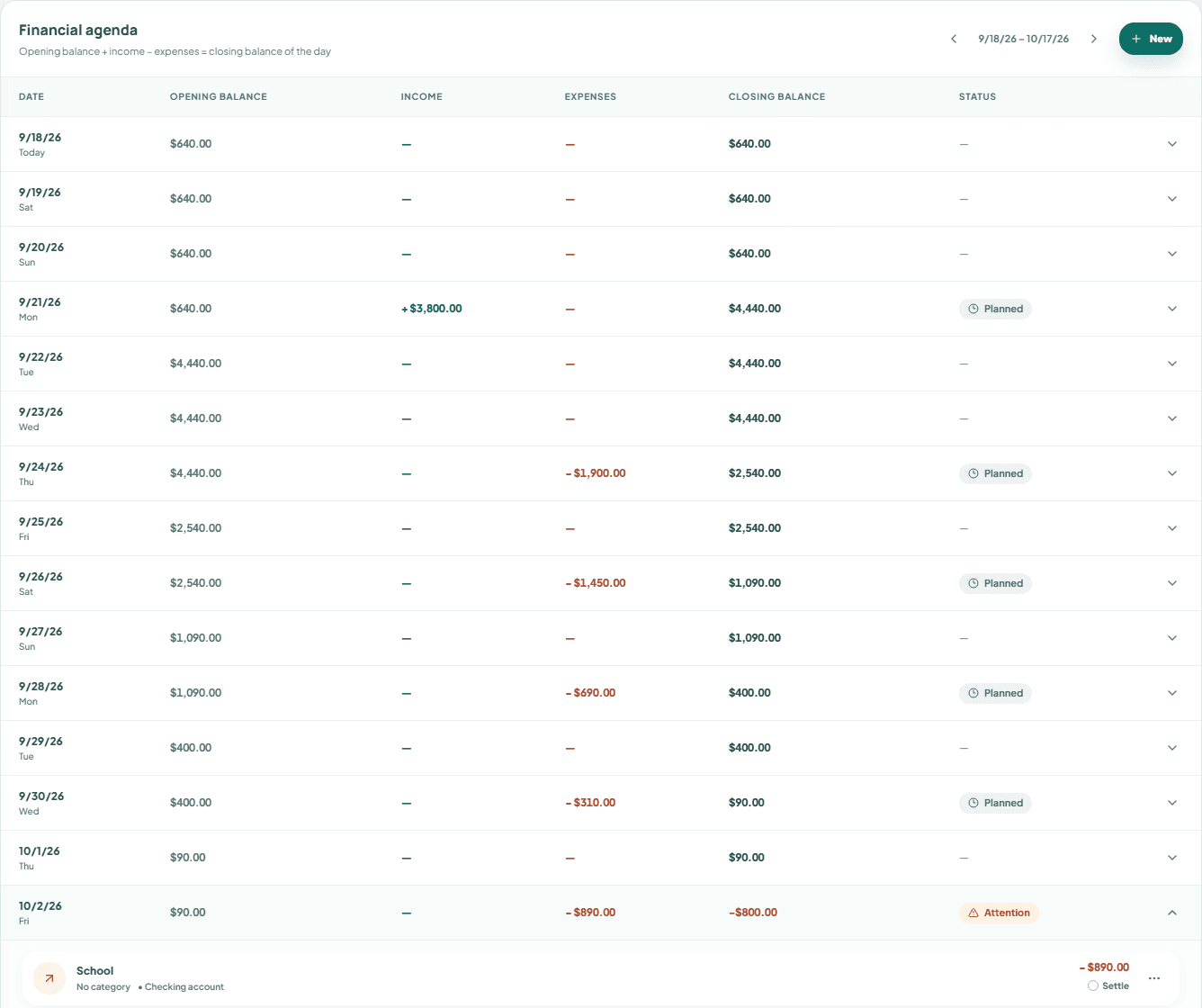
See your balance day by day, before it happens
Enter what comes in and what goes out once. Lykoset builds the timeline of your money and shows the balance for every day of the next 30, 60 or 90 days.
A timeline, not a statement
Each day shows what you start with, what comes in, what goes out and what you end with. You read the month like a calendar.
Salary, rent and installments entered once
Monthly recurrences, or a set number of installments, show up on their own in the months ahead. Due on the 31st in a 30-day month? Lykoset adjusts.
A warning before the first day in the red
If the balance is going to run short on some day, you see today which day it is and how much is missing, with time to bring money forward, postpone or renegotiate.
Planned next to actual
Paid a different amount, or on another date? Settle it with the real value. The planned one stays right beside it, so you can compare.
By account, if you want to
Split checking, card and savings to know where each amount leaves from and lands. Or keep a single overall balance. Your call.
Only what weighs on the month
No bank connection and no categorising every purchase: you enter what matters and Lykoset shows whether money will run short and on which day. Hide the amounts with one click when you're in public, and export everything to CSV whenever you like.
Is my data private?
Your data is isolated per account, never shows up in analytics tools, and can be exported or deleted whenever you want.
A list that answers: what do I do now?
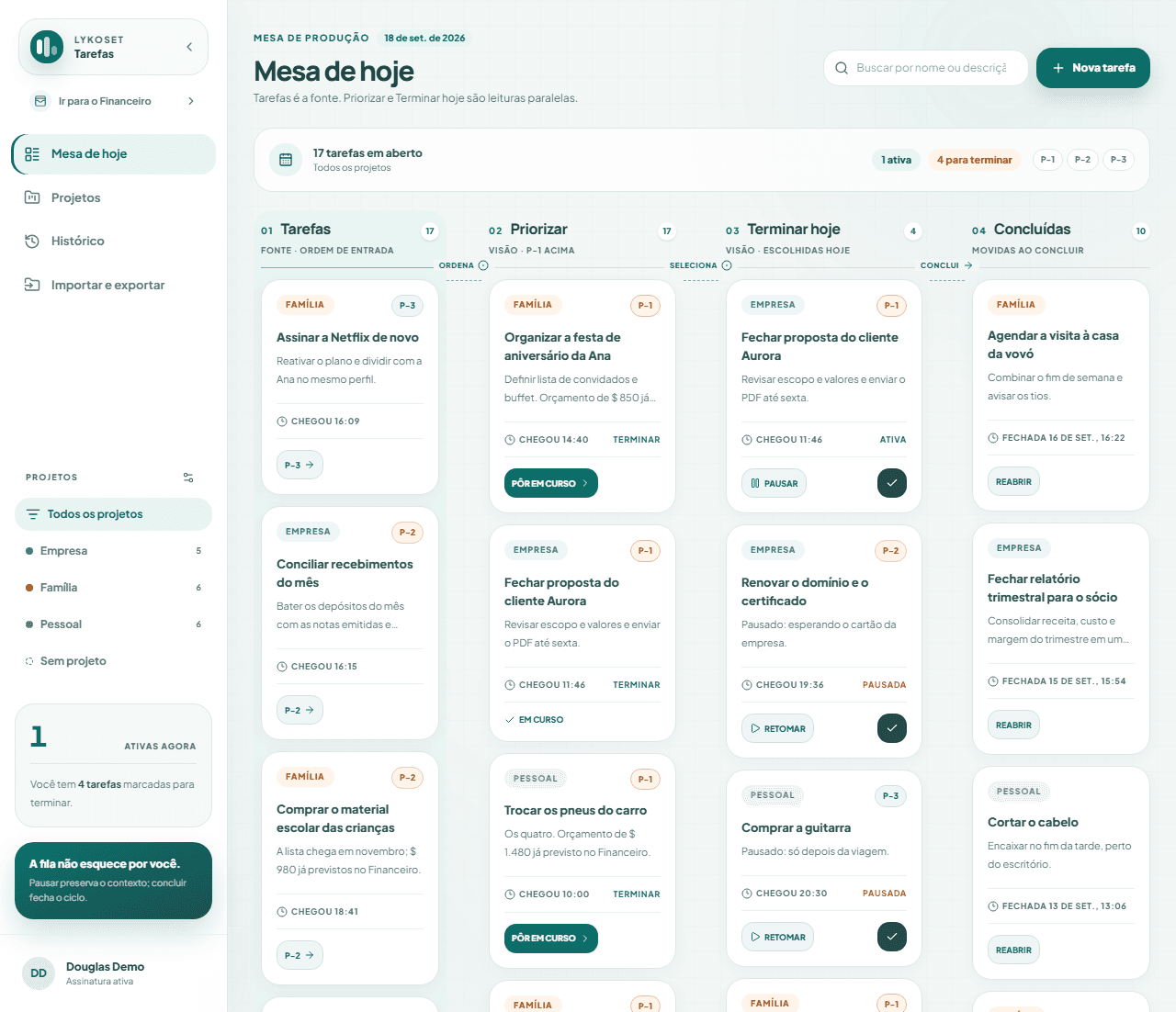
Write down what came up, mark what matters and pick what you'll do today. One screen, no complex boards and no setup.
- 01
What came up
Write it down in seconds, in the order it appears. Nothing stays only in your head.
Tasks
- 02
What matters
Move here only what matters now. Anything P-1 stays on top.
Prioritize
- 03
What I'm doing
Choose what gets into your day. Paused? The context is saved so you can pick it up again.
Finish today
- 04
What's finished
Done, out of your way, and kept in the history.
Done
Colour-coded projects to separate Home, Work and whatever else you have. Search, filters and history. Works on the phone, with tabs.
Built for people who live the month in practice
Freelancers and self-employed people with income that varies
When money arrives on different dates, knowing the balance of each day is what keeps things from getting tight.
Anyone with bills, installments and a card in the same month
See how the dates fit together before taking on one more installment.
Anyone tired of spreadsheets and apps that ask you to categorise everything
No broken formulas and no sorting every purchase. Enter what weighs, see the balance of each day, adjust.
Anyone who wants a simple task list
No boards, endless tags or methodology. One screen, four columns, focused on today.
From zero to your future balance in five minutes
- 1
Create your account
Google or e-mail. The 30 free days start right away, no card.
- 2
Enter what comes in and what goes out
Salary, rent, card, installments. Just once: Lykoset repeats them in the months ahead.
- 3
See the whole month, day by day
Your projected balance appears immediately. If money is going to run short on some day, you know now. Then open Tasks and write down what you need to do today.
Find out today how your month ends.
Create the account, enter your fixed bills and see the balance of each day in five minutes. Free for 30 days, no card.
Start 1 month free